Golf swing analysis on your phone: what it can read
A phone can do golf swing analysis, but not all of it, and the apps that claim all of it are the ones to distrust. If you want to analyze your golf swing at home, here is an honest guide to what a phone can read, how to film a swing so it can read it, and what to do with the result.
Two kinds of phone swing analysis
Phone-based analysis comes in two kinds, and they answer different questions.
Video analysis means filming yourself. The app watches the footage, finds your body in each frame and measures how you moved. It is good at posture, positions and body movement, because those are visible.
Motion sensing means the phone, or a watch, rides in your hands or on your body and reads how it moved. It is good at rhythm, speed and rotation, because the sensors feel those directly. Rakou does both, for different jobs, and swinging the phone itself is covered separately. This article is about the first kind: analysis from video.
How to film a swing so an app can read it
Most failed readings are filming problems, not swing problems. Get the camera right and the rest gets easier.
- Film from behind, on the target line. Stand so the camera looks down the line you are hitting along, over your trail shoulder. This is called down the line, and it shows how you hinge, how your arms hang and how your hands travel.
- Put your whole body and the ball in frame. Head to feet, with room above your hands at the top. Cropping your feet or your hands loses the very things being read.
- Place the phone at about hand height. Much higher or lower and the camera looks up or down at you, which distorts every angle in the picture.
- Hold it portrait. A golfer is tall and narrow. Portrait fills the frame with you instead of with the garage wall.
- Keep it steady. A tripod or something solid. Hand-holding adds movement that the app cannot tell from yours.
- Use good light and a plain background. A bright space with you standing in front of something calm gives the cleanest reading.
Common filming mistakes
- Filming face-on when the app expects down the line. The same swing looks very different from the front, and a reading built for one angle will misjudge the other. Check which view the app wants before you set up.
- Standing too close. If your hands leave the frame at the top, the app loses them. Step back until there is clear space above your head.
- Wearing baggy clothes. A loose jacket hides the shape of your hips and shoulders. Wear something fitted when you want a clean reading.
- Changing the setup between clips. If the phone moves, you cannot tell whether you changed or the camera did. Mark the spot on the floor.
What video can and cannot see
Pose detection is clever, and it has real limits. Knowing them keeps you from believing a number that should not be believed.
- It finds joints, not the club. The app sees your shoulders, hips, elbows and wrists. It does not see the clubface, so it cannot say whether the face was open or closed. Any app claiming that from a phone video is guessing.
- Depth along the lens is invisible. A camera sees sideways and up and down. Anything that happens toward or away from the lens is hard to read, which is why the filming angle matters so much.
- Bodies are different.People vary in height, build and flexibility by more than the gap between a good position and a poor one. A fixed rule such as “your shoulders should turn this far” will be wrong for a lot of people.
The answer to that last point is to measure you against your own body. A hip hinge or an arm hang is judged in lengths of your own torso, never in inches. That is the only honest way to make one rule fit many people. It is also why shoulder turn from behind is hard to score fairly, and why a careful app will use the shoulder line to find the top of the swing rather than to grade it.
How Rakou reads a swing
In Rakou you film one swing from behind, on the target line. The reading runs on the phone. Rakou finds the key moments of your swing: address, takeaway, top, downswing and impact. Then it checks ten points against your own body:
- Hip hinge
- Knee bend
- Arm hang
- Hand path
- Posture at the top
- Backswing length
- Hand depth at the top
- Downswing path
- Head at impact
- Posture through the ball
You get a whole-number score out of 10, a replay that stops at every checkpoint, and one priority to work on, with a drill for it. The club is not tracked. Rakou is looking at you, not at the club, and it says so.
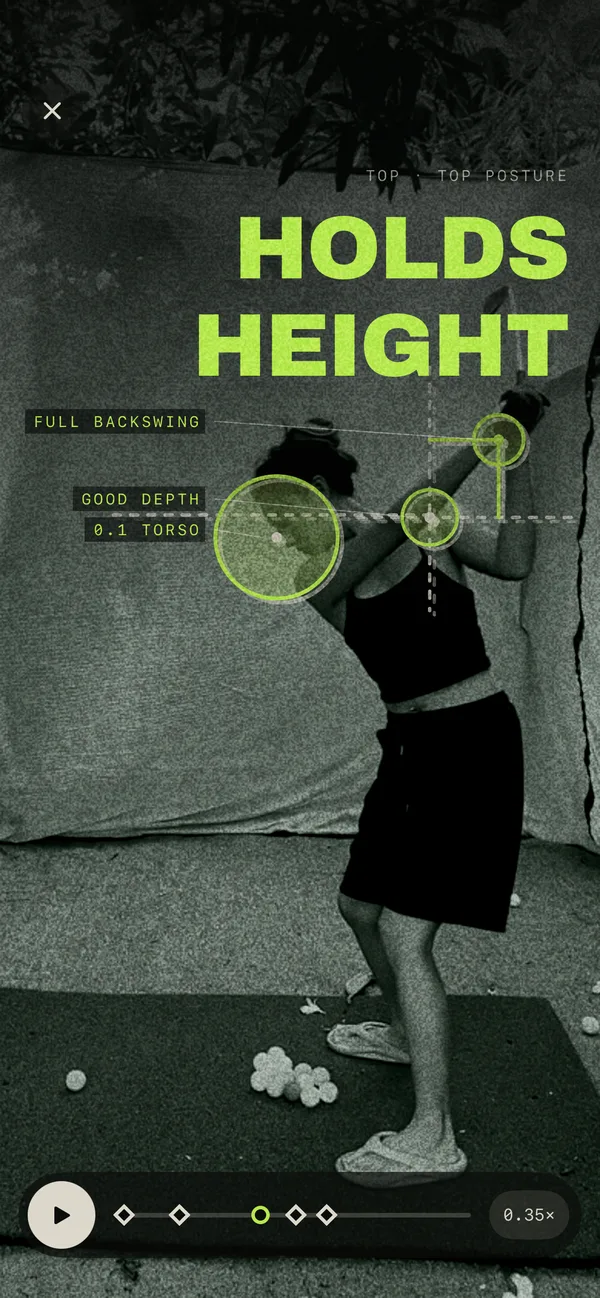
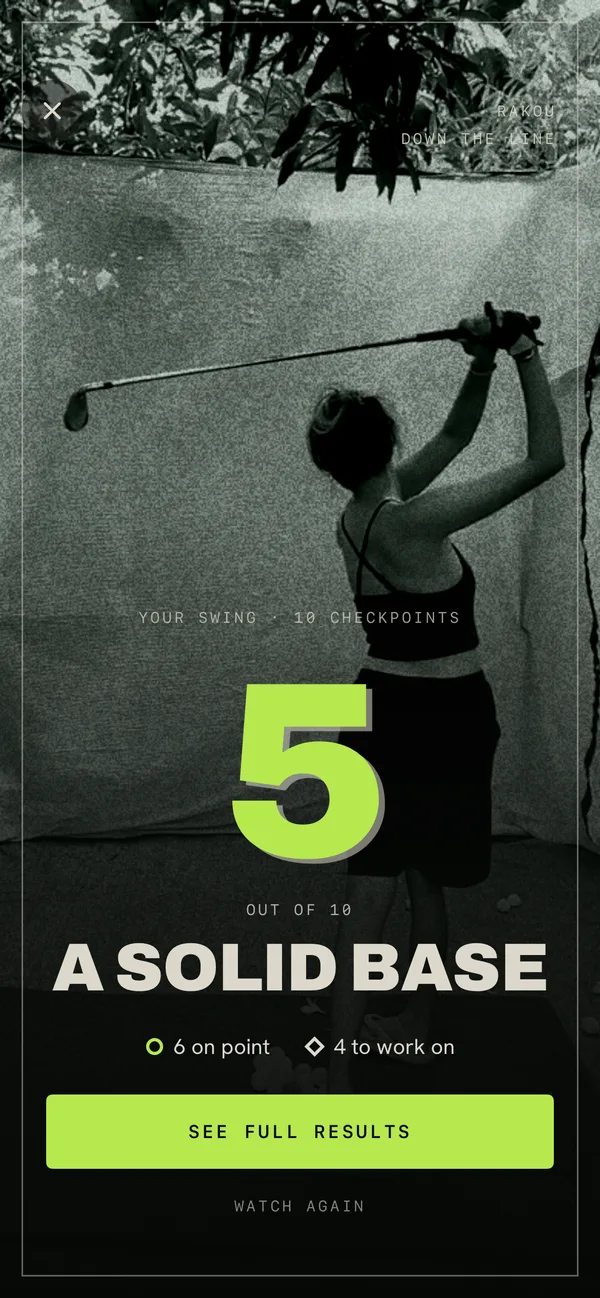
Two drills sit beside the reading. The metronome times a 3 to 1 rhythm with the phone in your hand. The mirror reads your posture face-on with the camera. The first leans on the motion sensors, the second on the camera.
Reading the result without overreading it
A score out of 10 is a summary, not a verdict. Look at the checkpoints, not the headline. The replay stops at each one so you can see what the app saw.
If something looks wrong in the replay, such as the app marking a position that is clearly not where your hands were, trust your eyes and film again. Bad light, a moved tripod or a cropped foot is the usual cause. One reading is a data point. A few readings over several weeks is a trend.
What to do with a reading: one fix at a time
The most useful thing a reading gives you is a priority. Ten checkpoints will almost never all be on point, and fixing ten things at once is how swings fall apart.
- Pick the one priority. Rakou names it. If you disagree, choose the checkpoint furthest from where it should be.
- Do the drill for it. A few minutes, most days, slowly and correctly.
- Check your rhythm too. Position changes often wreck tempo, and tempo is easy to check.
- Film again in a week. Same place, same angle, same camera height. Compare like with like.
- Keep what you can do at home going. Practice between readings is where the change happens. See how to practice golf anywhere.
If your ball curves left or right, a body reading will not solve it alone, because the club is not in the picture. For that, see how to stop slicing, which starts from the face and the path.
The short version
Video analysis reads your body, not your club, so film from behind on the target line with your whole body in frame and the phone steady at hand height. Be wary of any app that claims to see the clubface or measure depth from one camera. Judge you against your own body, work on the one priority it gives you, and film again in a week.
Common questions
- Can a phone analyze a golf swing?
- Yes, within limits. A phone camera can find your body's joints in a video and measure how they move, and a phone's motion sensors can time a swing and read how the phone turned. Neither can see the club or the ball the way a launch monitor does, so a good app is plain about what it reads.
- How do you film your golf swing for analysis?
- From behind, on the target line, with the phone in portrait at about hand height. Keep your whole body and the ball in frame, put the phone on something steady, and stand far enough back that your hands and club stay in view at the top.
- Can I analyze my golf swing at home?
- Yes. You need a phone, a steady place to prop it and enough room to swing. A garage or a backyard works for a real club. If you have no space, motion-based practice with the phone in your hands works indoors, though it reads different things.
- What does swing analysis from video miss?
- Depth along the lens is invisible, so anything that happens toward or away from the camera is hard to judge. Video also finds joints rather than the club, so it cannot tell you the clubface angle. Good analysis stays away from the things the picture cannot show.
- How many things should I fix after a swing analysis?
- One. A reading will often show several things, but changing several at once usually changes nothing. Pick the one that matters most, work on it with a drill, and film again.

Film one swing
Ten checkpoints, a score out of 10 and one thing to work on.